
Installing V-Ray for SketchUp
Before installing V-Ray for SketchUp, confirm you meet the following system requirements:
Note: V-Ray is only supported for 64-bit operating systems and 64-bit version of SketchUp.
Processor | Intel* 64, AMD64 or compatible processor with AVX2 support |
RAM | Minimum 8 GB RAM, recommended 16 GB RAM |
Hard Disk Space | Minimum 2GB, recommended 12GB (includes additional downloadable content) |
TCP/IP | Only IPv4 is supported. IPv6 is not supported |
Operating System | Windows 11 |
SketchUp | Current Supported Versions |
GPU Support | NVIDIA GPUs of Maxwell generation or later with the latest recommended video driver (for both CUDA and RTX-enabled cards). V-Ray Vision requires a graphics card with DirectX 11 or DirectX 12 and Shader Model 5.0 capabilities. |
Subscription | SketchUp Studio |
Users with a SketchUp Studio subscription can choose to download V-Ray for SketchUp along with other Studio entitlements in the Windows Installer.

If you have already installed SketchUp, you can install V-Ray for SketchUp by following these steps:
Download the V-Ray for SketchUp installer here:
https://www.sketchup.com/download_vray_win
The installer is also available on your My Products page. For more details on how to navigate to My Products, see My Products.
After the download completes, locate and double-click the .exe file to launch the V-Ray installer.
Review and agree the license agreements and click Continue for your installation options.

When prompted, select the version of SketchUp you are using.

Click Install to use the default installation options.
Or, click Advanced to specify if you want to install Chaos Swarm and licensing options. V-Ray for SketchUp requires the Local option for licensing.
After installation, options to open the release notes or share anonymous data with Chaos Group appear.

Click Done to close the installer.
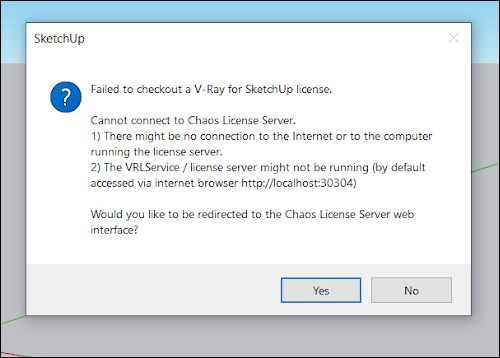
Clicking Yes on this message directs you to the Chaos License Server. Use your Trimble ID to login on that page. If you have a Studio entitlement this will link your account. If you do not, you will be notified there is not a license associated with your Trimble account.